

Master Mask
AI background removal for video and photos, on your own computer.
Cut the subject out of a video or a photo with a couple of clicks. The AI runs on your own computer, so nothing is uploaded and it keeps working offline.
No account. Just your email to download. Mac version is for Apple Silicon (M1 and newer).
☕Support my workStarts at ₹49 · keeps these tools freeSupport ↗Three steps
Made for editors: the result drops straight into your timeline.
Select
Drop in a video or photo. Press Auto select, or draw a box, or click on the subject. Add and remove points until it's right.
Track
For video, Master Mask follows the subject forward and backward through the clip. Bad frame? Add a point there and re-track from it.
Export
Save ProRes 4444 with alpha and the original audio, a PNG sequence, or a matte. Photos save as PNG with transparency.
What it does
Video and photo, in one app.
- Video cutouts at the original resolution, up to 4K input
- Sharp edges option for hair
- Edge controls: softness, grow / shrink, smooth
- Photo backgrounds: transparent, colour, blur or your own image
- Fast, Balanced and Best quality presets, picked for your computer
- Uses your GPU when there is one, and still works without
- Includes a DaVinci Resolve add-on (Free and Studio) and a command-line tool
Private by design
The AI models run on your computer.
- Nothing is uploaded. Your footage stays on your disk.
- No account, no sign-in, no tracking
- The first launch downloads the AI models (about 0.5 GB). After that it works offline.
- Exports open in DaVinci Resolve, Premiere Pro and Final Cut with transparency
What you need
On-device AI is heavy. A stronger computer means faster cutouts.
| Mac | Windows | |
|---|---|---|
| Minimum | Apple Silicon (M1), 8 GB RAM, macOS 13 or newer | Windows 10 or 11 (64-bit), 8 GB RAM. Works without a graphics card, slower. |
| Recommended | Apple Silicon, 16 GB RAM | Any DirectX 12 graphics card (NVIDIA, AMD or Intel), 16 GB RAM |
Intel Macs are not supported in this version.
How to install
Master Mask is new and not signed with a paid certificate yet, so your computer asks once before opening it.
Mac
- Open the .dmg and drag Master Mask into Applications.
- Open Master Mask. If macOS says it can't be opened, go to System Settings → Privacy & Security and press Open Anyway.
- On the first launch it downloads its AI models. After that it works offline.
Windows
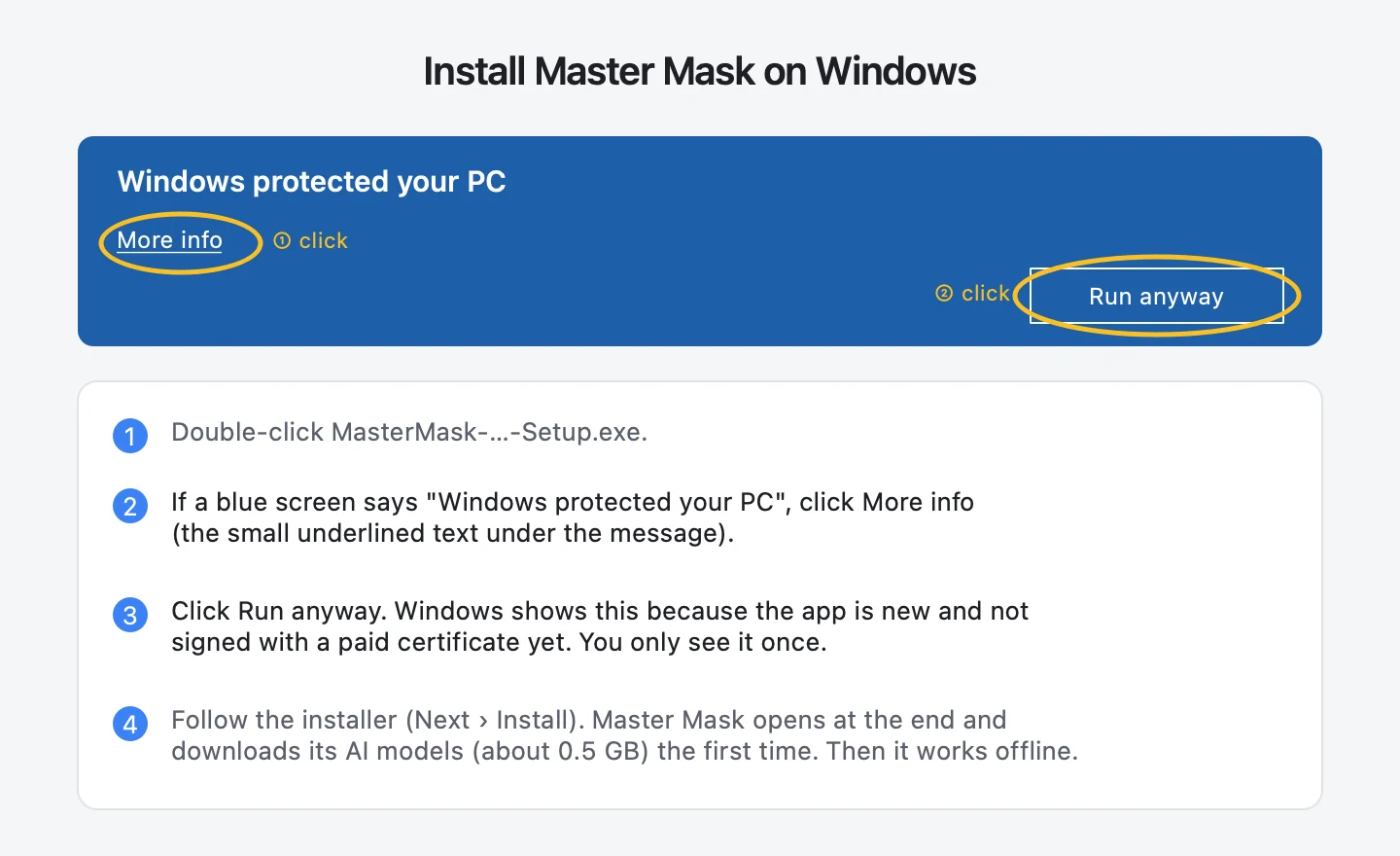
- Double-click the Setup.exe.
- If a blue screen says "Windows protected your PC", click More info, then Run anyway.
- Follow the installer. Master Mask opens at the end and downloads its AI models the first time.
Get Master Mask
Found a bug? Mail [email protected] with your computer model. Master Mask uses open-source AI models (SAM 2.1 and BiRefNet); their licenses are listed inside the app.
Like the free plugins? Buy me a filter coffee.
Every plugin here starts free. Your coffee keeps new ones coming, and you get the Free Creator Vault as a thank-you.
☕ Buy me a coffee · from ₹49 ↗Say hello
Bug in a plugin, an idea for the next one, or a collab? Message me.
@hariharan.editingmaster [email protected]